Introduction
Ask an end user what Remote Desktop is, and they will likely describe working from home or accessing a distant PC. Ask an IT administrator, and the answer changes completely. For IT teams, Remote Desktop is not a convenience feature: it is the backbone of Windows administration and RDS operations. From routine maintenance to incident response, Remote Desktop sessions are how administrators interact with servers and users every day. Understanding this operational reality is essential to running RDS securely and efficiently at scale.
What Does Remote Desktop Mean for IT Teams (Not End Users)?
Industry definitions from sources such as TechTarget and Microsoft describe Remote Desktop as the ability to connect to and interact with a remote computer’s graphical desktop over a network. While accurate, this definition understates its importance in production environments.
For IT teams, Remote Desktop is the primary control channel into Windows servers. It is how administrators configure systems, diagnose problems, install updates, and intervene during outages. In RDS environments, this role is amplified: a single Remote Desktop session can affect dozens or hundreds of connected users. More than a simple access method, Remote Desktop is therefore an operational dependency.
How Is Remote Desktop Used in Real RDS Environments?
In environments built on Microsoft Remote Desktop Services, Remote Desktop is used continuously, not occasionally. Administrators connect to session hosts to manage applications, review user activity and respond to performance issues. Support teams rely on Remote Desktop to assist users without requiring physical access to machines.
Unlike one-to-one remote PC scenarios, RDS environments are inherently multi-user. Multiple Remote Desktop sessions run concurrently on the same servers, sharing CPU, memory, disk and network resources. This makes Remote Desktop both powerful and fragile: a single misbehaving session or configuration change can degrade the experience for many users at once.
The Operational Challenges of Managing RDS at Scale
Limited session visibility
One of the first challenges IT teams encounter is visibility. Native Windows tools provide only partial insight into who is connected, what they are doing and how resources are being consumed. Administrators can struggle to answer basic questions such as which sessions are driving CPU spikes or how long users remain connected.
How RDS Tools helps:
RDS Tools Server Monitoring provides real-time and historical visibility into server health and usage. By correlating Remote Desktop activity with system performance, IT teams gain a clearer understanding of how sessions impact overall stability.
Reactive troubleshooting
In many RDS environments, issues are discovered only after users complain. Performance degradation, stalled sessions or service outages often go unnoticed until productivity is already affected. This reactive model increases downtime and pressure on support teams.
How RDS Tools helps:
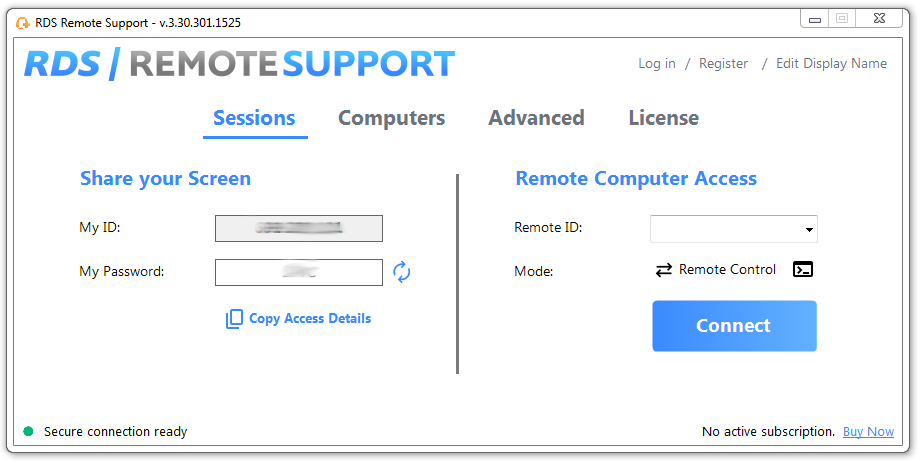
With proactive alerts and threshold-based monitoring, RDS Tools Server Monitoring allows administrators to detect abnormal behaviour early. The added tool set of RDS Remote Support makes easy any direct action needed on remote machines. This shifts operations from reactive firefighting to effective preventive maintenance.
Security blind spots in RDP and RDS
Remote Desktop is also a common attack vector. Exposed RDP endpoints are frequently targeted by brute-force attacks, credential abuse, ransomware campaigns and more. In multi-user RDS setups, a single compromised account can have wide-ranging consequences.
How RDS Tools helps:
RDS Tools Advanced Security focuses specifically on protecting RDP and RDS environments. Features such as brute-force protection, IP filtering and geo-restrictions reduce exposure without requiring complex redesigns of existing infrastructure.
Why Is Native RDS Tooling Not Enough?
Microsoft RDS provides the access layer needed to deliver desktops and applications, but it was not designed to provide deep operational oversight. Event logs are fragmented, session data is difficult to aggregate, and security controls often rely on external tools or manual processes.
As RDS environments grow, these limitations become more pronounced. Administrators need consolidated visibility, automated protection, and practical monitoring tools which operate alongside RDS rather than replacing it. This gap is where complementary tooling becomes essential.
How Can RDS Tools Enhance RDS Operations?
RDS Tools Server Monitoring: Seeing What’s Really Happening
RDS Server Monitoring gives IT teams a centralized view of RDS infrastructure health. Track CPU, memory, disk usage and service availability across session hosts. Now agents and administrators can quickly identify bottlenecks and trends. Historical data supports capacity planning and helps justify infrastructure changes before problems escalate.
RDS Tools Advanced Security: Protecting RDS Where It’s Most Exposed
RDS Advanced Security adds a focused security layer around Remote Desktop access. Instead of relying solely on perimeter defenses, it enforces protection directly where attacks occur: at the RDP entry point. Automated blocking and access controls reduce the risk of unauthorized access while minimizing administrative overhead.
RDS Tools Remote Support: Supporting Users Without Disrupting RDS
RDS Remote Support enables IT teams to assist users interactively without terminating sessions or requiring full administrative logins. This separation between support activity and server administration improves response times while preserving system stability and auditability.
How Do IT Teams Use These Tools Together?
In practice, RDS Tools products are often used as a pick and mix modular stack. Monitoring detects early signs of trouble, security ensures the issue is not malicious, and remote support resolves user-level problems quickly. This layered approach aligns with how IT teams actually work and scales more effectively than relying on native tools alone.
In Conclusion: For Remote Desktop at Scale, Control Matters More Than Access
Remote Desktop itself is neither outdated nor insecure. Problems arise when it is deployed without sufficient visibility, protection and operational insight. At scale, success depends less on enabling access and more on maintaining control.
For IT teams running RDS environments, Remote Desktop is the interface through which everything happens. Tools enhancing monitoring, security and support do not replace RDS! They make it broadly manageable. By treating Remote Desktop as an operational system rather than a simple feature, organizations can run RDS environments which are both resilient and secure.
RDS Remote Support Free Trial
Cost-effective Attended and Unattended Remote Assistance from/to macOS and Windows PCs.

)

)
)
)
)
