Weighing VDI against RDP and RDS really amounts to deciding between per-VM isolation (VDI) and multi-session efficiency (RDS). For many SMB and mid-market teams, the fastest path to lower TCO (Total Cost of Ownership) and higher security is to keep RDS while adding targeted controls. Here is a set of stepping stones to make that decision and implement to essential protection, such as security hardening, monitoring, alerting, friction-less printing and a tight remote-support loop.
Context: Would You Like a Quick Recap of VDI, RDP, RDS?
- Brief descriptions
- Benefits of Uses
Brief descriptions:
VDI (Virtual Desktop Infrastructure) runs a full desktop for each user as an isolated VM in your data center or cloud, brokered by a platform. It shines for strict isolation, mixed OS images and GPU-heavy apps, but it is costlier and more complex to run (images, storage, brokers).
RDP (Remote Desktop Protocol) itself is transport rather than a full platform or broker. It is the Microsoft remote display protocol which streams keyboard/mouse and screen between a client and a Windows host. Notably, it is used by RDS (and many other tools).
RDS (Remote Desktop Services) publishes Windows apps or desktops from multi-session Session Hosts over RDP. It maximizes density and simplicity for Windows workloads, and with the right security tools, covers most SMB and midmarket needs at lower Total Cost of Ownership (TCO).
Benefits and Uses:
Choose VDI when: you need per-user isolation, non-Windows images, high-security segmentation or sizable GPU cohorts.
Choose RDS when: most users run Windows apps, you want higher user density and simpler ops. Also, pick it when you can meet security and compliance through hardening such as gateway and MFA and adding monitoring controls.
Step 1: How Will You Define Your Requirements?
Before you touch on cost, there are questions of needed infrastructure, preferences relating to your field and business, degrees of security and data protection and other specifics which you need to define to better compare and choose between VDI and RDS.
- Users & concurrency: task workers vs. knowledge workers. What should be your peak percentage of online users at one given moment?
- Data & compliance: does data need to stay on servers? What are your jurisdiction limits?
- Apps: what applications does your company use? Which apps do your users access remotely which therefore need protection? For example, Office/SaaS vs. legacy Win32… What about print workflows or any peripherals?
- Network: where do users “sit”? Where are latency, packet loss and other bottlenecks expected or critical? And when?
- Special cohorts: Do you have engineers, designers or others who need heavy-duty GPU, or Independant Software Vendor-certified apps, for instance?
Step 2: What Kind of Cost Model Might You Actually Use?
- Creating a Cost Model Calculator
- Did your eyes jump out at those acronyms?
- Tables to help you create a TCO calculator
Creating a Cost Model Calculator
Use our tables to create a calculator in Excel and update it with your own figures: Windows Server/RDS CALs, number of Session Hosts, years, support %, and any VDI/DaaS rates. It provides pointers to compute Year-1 CAPEX, annual OPEX, 3-year TCO, and NPV for three options:
1) RDS (native),
2) RDS + RDS-Tools,
3) VDI.
Did your eyes jump out at those acronyms?
Or do you just want a reminder? Such as Total Cost of Ownership for TCO. Here it is, and how a calculator applies.
CapEx = Capital Expenditure
Money you spend up front on long-lived assets. In IT, these are purchases you capitalize on the balance sheet and depreciate over years.
- Examples in this context:
- Buying Windows Server licenses tied to a server
- Purchasing perpetual RDS-Advanced Security licenses (one-time, per-server)
- Buying physical servers, storage, GPUs
- Accounting mood: cash today, expense spread over time (depreciation/amortization).
OpEx = Operating Expenditure
Recurring costs to run the service day-to-day. These hit the income statement in the period you consume them.
- Examples in this context:
- Monthly/annual support & maintenance for software
- RDS-Tools Remote Support billed per concurrent connection per month
- VDI/DaaS per-user platform fees, storage/IO, GPU-hours
- Cloud egress, monitoring subscriptions, MFA/IdP user fees
- Accounting mood: smaller recurring and ongoing spend (no depreciation or amortization).
Quick compare
| Relation to expenditure
| Capital Expenditure | Operational Expenditure |
| Timing | Upfront | Ongoing (monthly/annual) |
| Accounting | Capitalized; depreciated | Expensed immediately |
| Cash flow | Larger spikes | Smoother, predictable |
| Typical items | Perpetual licenses, hardware | Subscriptions, support, cloud usage |
| In our table | “Year 1 CAPEX” cells | “Year 1 / Years 2–3 OPEX” cells |
Why does this matter for your decision?
- RDS + RDS-Tools often skews a bit more CAPEX (perpetual per-server licenses) with modest OPEX (support, Remote Support seats).
- VDI/DaaS is usually heavier OPEX (per-user/month + infra), lighter CAPEX.
Reality check: exact treatment can vary by your accounting policy (e.g., capitalization thresholds, IFRS/GAAP). For planning, think CAPEX = one-time; OPEX = subscription/usage.
Items and Tables to help you create a TCO calculator:
Input
Here are examples of data we think would be necessary for this calculation:
General Assumptions (example - modify to your stats)
Number of Users - 100
Peak Concurrency (%) - 70
Number of RDS Session Host Servers - 3
Analysis Horizon (years) - 3
Annual Support (if applicable) - 20%
Discount Rate (for Net Present Value (NPV)) - 8%
RDS Base (edit with your licenses)
Windows Server license per server (CAPEX) - 0
RDS CAL per user (CAPEX) - 0
RD Gateway / Broker HA (CAPEX) - 0
MFA / IdP cost per user per month (OPEX) - 0
RDS‑Tools (basic defaults from our website - edit to suit your requirements)
RDS Tools Advanced Security edition price per server (CAPEX) - 180$
RDS Tools Server Monitoring price per server (CAPEX) - 110$
Proportional Updates and Support (OPEX) - 108.5$
Remote Support yearly - 96$
- Remote Support price per concurrent connection per month (OPEX) - 8$
- Number of Remote Support concurrent connections - 1
VDI (example placeholders - replace with your provider's figures)
VDI platform license per user per month (OPEX) - 25$
Storage & infra per user per month (OPEX) - 15$
GPU premium per GPU user per month (OPEX) - 50$
Users needing GPU - 10%
Image management & ops FTE cost per year (OPEX) - 30000$
Summary
| Metric | RDS (native) | RDS + RDS‑Tools | VDI |
| RDS (native) | | | |
| RDS + RDS‑Tools | | | |
| VDI | | | |
| Year 1 CAPEX | | | |
| | | |
| Decision Score (higher is better) | | | |
| Weighted Score | | | |
RDS
Below are items which could figure and provide you with comparable values for your decision:
Users
Concurrency
Servers
Years
- RDS Native (edit according to licenses you hold)
Windows Server per server (CAPEX)
RDS CAL per user (CAPEX)
RD GW/Broker HA (CAPEX)
MFA per user per month (OPEX)
Year 1 CAPEX (native)
Year 1 OPEX (native)
Years 2 3 OPEX per year (native)
3 Year TCO (native)
NPV 3 Year (native)
- RDS + RDS Tools (complete data as needed)
Advanced Security CAPEX
Server Monitoring CAPEX
Remote Support OPEX (yearly)
RDS Updates & Support OPEX (yearly)
Year 1 CAPEX (RDS + Tools)
Year 1 OPEX (RDS + Tools)
Years 2 3 OPEX per year (RDS + Tools)
3 Year TCO (RDS + Tools)
NPV 3 Year (RDS + Tools)
VDI
Here is much the same for VDI. This is an idea of what it might look like in a table:
| Item | Value |
| Users | 0 |
| Years | 0 |
| VDI platform per user per month | 0 |
| Infra per user per month | 0 |
| GPU premium per GPU user per month
| 0 |
| % GPU users
| 0 |
| Image mgmt & ops per year
| 0 |
| |
| Year 1 CAPEX (VDI)
Year 1 OPEX (VDI) | 0 |
| Years 2‑3 OPEX per year (VDI) | 0 |
| 3‑Year TCO (VDI) | 0 |
| NPV 3‑Year (VDI) | 0 |
Decisions Matrix
Finally, here is what a decision matrix could look like and contain. Of course, once more, the values will depend on what you put in and calculated above.
| Criteria | Weight | Definition | RDS (native) | RDS + RDS‑Tools | VDI |
| Cost (lower is better) | 0.35 | 3‑Year NPV TCO (relative) | | | |
| Security | 0.25 | Controls, MFA/Gateway, IP/GEO, ransomware detection | 3 | 5 | 5 |
| User Experience | 0.25 | App performance, printing, remote support experience | 3 | 4 | 4 |
| Operations | 0.15 | Image mgmt, monitoring, alerts, helpdesk efficiency | 3 | 5 | 3 |
| | | | | |
| Weighted score | | | - | - | - |
| Total | | | - | - | - |
Where does RDS-Tools fit in this calculation?
- Proactive security (per-server perpetual license). Check RDS-Advanced Security features to know more.
- Pricing flexibility for investment or budgeting: per-server, perpetual (1 year updates/support included) or subscriptions.
- Server & website monitoring with real-time data and alerts (per-server, perpetual or subscription).
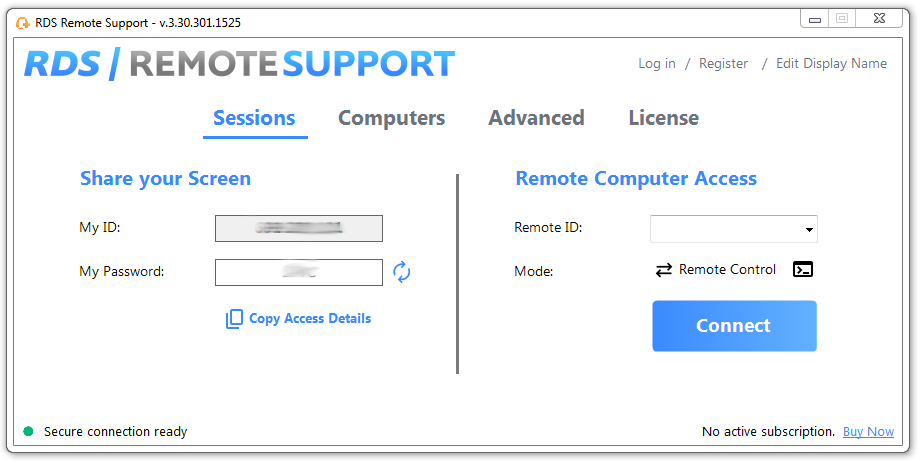
- Remote Support for helpdesk: subscriptions start at a low monthly rate per concurrent connection.
Try some calculations to test how 50–300 user scenarios with “RDS + RDS-Tools” beat VDI on 3-year TCO while closing most of the security and UX gap for non-GPU users.
Step 3: How Can You Make "Risk & Security" Scores Measurable?
These are distinctly important to smooth operations, therefore avoid overlooking them. To quantify risk and security aspects, try assigning 0–5 to each of the 4 broad areas of control, then total your risk reduction.
- Exposure surface: gateway + MFA, IP/GEO restrictions and brute-force defense. Map these to RDS-Advanced Security (Hacker IP, GEO filtering, Bruteforce Defender, working-hours rules).
- Ransomware response & safe sessions: enable instant ransomware detection and lock-down options.
- Trusted devices & permissions: enforce per-user controls to reduce insider and accidental risk.
- Operational visibility: real-time monitoring, performance dashboards, alerting and exportable logs.
Score your current state and your target state (with tools). The delta is your quantified security uplift.
Step 4: Performance & UX, Or What Do Users Say Of It?
- Session density vs isolation: RDS multi-session yields strong density for task or office users; reserve VDI for strict isolation or GPU needs (subset).
- Faster helpdesk loops: embedded remote control, with its file-transfer, chat, attended or unattended, etc. and cut Mean Time To Resolution for user issues.
A further idea for UX is to go driverless to remove printer-driver mismatches and fragile redirection. Look out for brands who provide such solutions.
Step 5: Why a Decision Matrix?
Beyond helping you see clearly to make an informed choice, the decision matrix can certainly come in useful, for example to support your arguments explaining the choice you make.
Weighting:
Here is an example of how you might decide to apportion importance to different areas: Cost 35% | Security 25% | UX 25% | Operations 15%. This will largely depend on your field of business and internal needs.
That done, score each option 0-5; multiply by weights; the highest total wins.
| Option | Cost (35%) | Security (25%) | UX (25%) | Ops (15%) | Weighted Total |
| RDS (native) | Low | Medium (gateway+MFA) | Good | Good | - |
| RDS + RDS-Tools | Low–Med | High (IP/Geo, brute-force, ransomware, trusted devices) | High (reliable, secure, benefits of remote support) | High (monitoring, alerts) | Likely winner |
| VDI | Medium–High | High (per-VM isolation) | High | Medium (image mgmt overhead) | Depends on GPU users |
Some Recommended Blueprints
If inspiration or time are short, here are some basic examples of setups usable as blueprints.
1) Small IT team (≤100 users)
- Hardened RDS with RD Gateway + MFA.
- Add RDS-Advanced Security for IP/GEO blocks, brute-force defense, ransomware detection, trusted devices.
- Add RDS Server Monitoring for real-time visibility and alerting.
- Give help via RDS-Remote Support (unattended supported).
2) Task workers at scale (100–500 users)
- RDS farm with Broker HA and load-balancing; standardize a golden host image.
- Monitor capacity & sessions with RDS Server Monitoring; automate alerts and export logs for support.
- Enforce Advanced Security policies org-wide; review reports monthly.
3) Engineers or designers (subset)
- Hybrid: keep most users on hardened RDS + tools; put GPU groups on VDI/DaaS if need requires.
- Continue to use RDS-Tools on the RDS side for security, monitoring and support
30-60-90 Day Rollout (a copy/paste plan)
Days 1–30 (Foundation)
- Inventory exposure; ensure RD Gateway + MFA.
- Deploy RDS-Advanced Security on internet-facing/broker/session hosts; enable Hacker IP, GEO, Bruteforce, Working-Hours, Ransomware, Trusted Devices.
- Stand up RDS Server Monitoring and tune initial alerts/dashboards.
Days 31–60 (Scale & Ops)
- Expand to all hosts; set monthly security/ops reports from Monitoring.
- Roll RDS-Remote Support to helpdesk; establish unattended access for managed endpoints.
Days 61–90 (Optimize)
- Capacity tuning and image hygiene.
- Quarterly tabletop: ransomware response & account-lockout playbooks (use Advanced Security + Monitoring data).
FAQs
Is VDI “more secure” than RDS?
It depends on which RDS you’re comparing. Plain RDS may lag isolation, but RDS + RDS-Advanced Security (IP/GEO blocking, brute-force defense, ransomware detection, trusted devices) plus a gateway/MFA drastically reduces risk for most SMB/mid-market cases.
Does RDS-Tools replace remote access?
No. RDS-Tools enhances your Microsoft RDS stack (security, monitoring, printing, remote support). Keep your existing RDS access model; add the controls and visibility you’re missing.
Can I support users without sending them to a third-party viewer?
Yes. RDS-Remote Support provides encrypted screen control, chat, file transfer, and unattended access where needed.
Conclusion
VDI and RDS both deliver Windows workspaces while addressing different issues. If you only need strict per-user isolation, diverse images or sizable GPU workloads, VDI should earn its keep despite higher cost and operational complexity. If most users run standard Windows apps, RDS delivers greater density and simpler ops. You should guard it appropriately (gateway + MFA), add monitoring and remote support, including driverless printing where needed, to close most security and UX gaps at a much lower Total Cost of Ownership.
For many teams, the pragmatic answer is hybrid: keep the majority on hardened RDS enhanced with RDS-Tools and reserve VDI for the niche teams who truly need it. Revisit quarterly to yearly according to how your user mix and risk evolve.
RDS Remote Support Free Trial
Cost-effective Attended and Unattended Remote Assistance from/to macOS and Windows PCs.

)

)
)
)
)
